

Shopping for a home security camera used to be simple: you picked a brand, mounted it near the front door, and hoped for the best. Today, one of the first specs you'll encounter is resolution - 720p, 1080p, 2K, or 4K - and each option comes with real trade-offs in image clarity, storage requirements, cost, and even internet bandwidth usage. Picking the wrong resolution isn't just a minor inconvenience; it can mean the difference between capturing a clear image of a package thief's face and ending up with a blurry, unusable clip.
This guide breaks down what each resolution actually means in practice, where it makes sense, and what trade-offs you're accepting at each tier.
Understanding What "Resolution" Actually Measures
- Definition: Resolution refers to the number of pixels a camera captures in each frame, usually expressed as width x height (for example, 1920 x 1080 for 1080p).
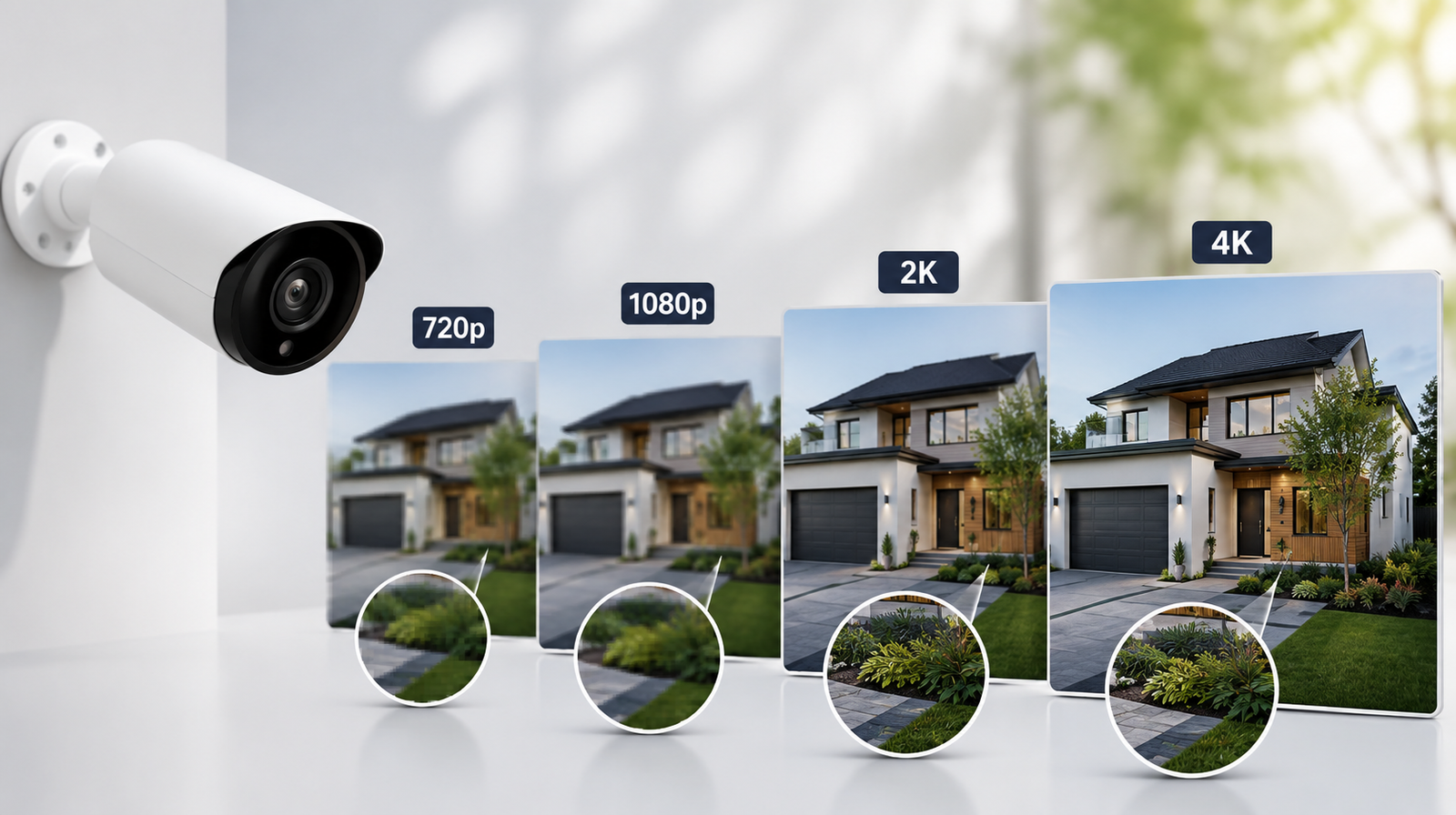
- Why it matters: More pixels mean more visual detail, which translates to sharper images, especially when you zoom in or crop footage after the fact.
- What it doesn't guarantee: Resolution is only one factor in image quality. Lens quality, sensor size, low-light performance, and video compression all play a role in how good the footage actually looks, meaning a well-designed 1080p camera can sometimes outperform a poorly designed 4K one.
Explanation: It helps to think of resolution as the size of the canvas rather than the entire picture. A larger canvas allows for more detail, but the quality of the paint, brush, and lighting - the camera's lens, sensor, and processing - still determines how good the final image looks. This is why comparing resolution numbers alone can be misleading.
720p: The Entry-Level Option
- Pixel count: Approximately 1 megapixel (1280 x 720).
- Best suited for: Budget-conscious buyers monitoring low-priority areas, such as a backyard shed or a secondary entrance where identifying fine facial detail isn't critical.
- Storage advantage: Because file sizes are smaller, 720p footage requires significantly less storage space, which can reduce cloud subscription costs or allow longer local recording retention.
- Key limitation: Zooming into footage - say, to read a license plate or clearly see a face from a distance - often results in a pixelated, unusable image.
- Bandwidth friendliness: Lower resolution means less strain on your home internet connection, which can matter if you're running multiple cameras on a limited bandwidth plan.
Explanation: 720p cameras aren't obsolete, but they're best reserved for situations where general activity monitoring matters more than fine detail - like confirming that a gate was opened, rather than identifying who opened it.
1080p: The Practical Middle Ground
- Pixel count: Approximately 2 megapixels (1920 x 1080), often called "Full HD."
- Best suited for: Most residential applications, including front doors, driveways, and general perimeter monitoring, where identifying faces and license plates at moderate distances matters.
- Balanced storage needs: File sizes are larger than 720p but still manageable for most cloud storage plans and local storage devices without excessive cost.
- Widely compatible: Most budget-to-midrange smart home ecosystems, apps, and monitors are optimized for 1080p playback, meaning smoother app performance and less lag when reviewing footage.
- Reasonable price point: 1080p cameras typically offer the best value-to-performance ratio, sitting comfortably between low-end and premium pricing tiers.
Explanation: For the average homeowner, 1080p often represents the sweet spot. It provides enough detail to identify a visitor's face or read a vehicle's license plate under decent lighting conditions, without the storage and bandwidth demands that come with higher resolutions.
2K: The Underrated Upgrade
- Pixel count: Approximately 4 megapixels (2560 x 1440), sometimes labeled QHD.
- Best suited for: Homeowners who want noticeably better clarity than 1080p - particularly for zooming into footage after an incident - without jumping to the storage and cost demands of full 4K.
- Improved digital zoom: Because there are more pixels to work with, 2K footage holds up better when cropped or zoomed compared to 1080p, making it useful for wider coverage areas like large driveways or yards.
- Moderate storage increase: Storage requirements rise compared to 1080p, but the increase is usually manageable, especially with modern cloud compression algorithms.
- Price consideration: 2K cameras sit in a middle price tier - pricier than 1080p options but generally more affordable than premium 4K models.
Explanation: 2K is often overlooked because 4K gets more marketing attention, but for many households, it delivers a meaningful clarity improvement without the steep storage costs associated with the highest resolution tier. It's particularly useful for cameras covering a wide field of view, where extra pixels help maintain detail across a larger frame.
4K: Maximum Detail for Demanding Situations
- Pixel count: Approximately 8 megapixels (3840 x 2160), also called Ultra HD.
- Best suited for: High-security needs - such as covering large properties, commercial entrances, or areas where identifying fine detail (faces, license plates, small objects) from a distance is critical.
- Exceptional zoom capability: 4K footage can be cropped and zoomed extensively while retaining usable clarity, which is invaluable for post-incident investigation or law enforcement footage requests.
- Significant storage demand: 4K video files are considerably larger, which can quickly consume local storage or increase cloud subscription costs, especially with multiple cameras recording continuously.
- Higher bandwidth requirement: Streaming and uploading 4K footage requires a stronger, more stable internet connection, particularly if you're running several cameras simultaneously or relying on live remote viewing.
- Premium pricing: Both the cameras themselves and the associated storage infrastructure tend to cost more, making 4K a bigger investment overall.
Explanation: 4K makes the most sense when the cost of missing a critical detail outweighs the added expense - for example, a business owner who needs to positively identify a suspect, or a homeowner monitoring a large, high-value property. For casual residential use, the benefits may not always justify the added cost and storage burden.
Other Factors That Affect Your Decision
- Low-light performance: A high-resolution camera with a poor sensor can still perform worse in darkness than a lower-resolution camera with strong night vision or infrared capabilities.
- Field of view: Wider-angle lenses benefit more from higher resolution, since the same number of pixels is spread across a larger area, reducing per-object detail.
- Storage method: Cloud storage plans often price by resolution tier, while local storage (SD cards or NVR systems) depends on your available capacity - factor both into your long-term costs.
- Number of cameras: Running multiple high-resolution cameras simultaneously multiplies both bandwidth usage and storage needs, which can add up quickly across a multi-camera system.
- Purpose of footage: Consider whether you primarily need general activity awareness (lower resolution may suffice) or detailed identification evidence (higher resolution becomes more valuable).
Conclusion
Choosing the right security camera resolution isn't about picking the highest number available - it's about matching the camera's capabilities to your actual security needs, budget, and storage capacity. For general residential monitoring, 1080p remains a reliable, cost-effective choice. If you want noticeably sharper detail without a major cost jump, 2K offers a strong middle path. And for properties where precise identification is essential, 4K provides the clarity that lower resolutions simply can't match. By weighing resolution alongside factors like low-light performance, storage needs, and field of view, you can select a camera system that actually meets your household's security priorities.
FAQs
Q. Is 1080p good enough for most home security needs?
Yes, for the majority of residential applications, 1080p offers sufficient detail to identify faces and vehicles at typical distances while keeping storage and bandwidth demands manageable.
Q. Does higher resolution always mean better image quality?
Not necessarily. Lens quality, sensor size, and low-light performance all significantly affect image quality, meaning a well-built 1080p camera can sometimes outperform a poorly designed 4K model.
Q. How much extra storage does a 4K camera require compared to 1080p?
4K footage file sizes can be roughly four times larger than 1080p, depending on compression settings, which meaningfully increases both local storage needs and cloud subscription costs.
Q. Is 2K resolution worth the extra cost over 1080p?
For many households, yes - 2K provides noticeably better digital zoom and detail retention, particularly useful for wide-coverage areas, without the steep storage demands of full 4K.
Q. Will a higher resolution camera use more internet bandwidth?
Yes. Higher resolution footage requires more data to stream or upload, so running multiple high-resolution cameras on a limited internet plan can strain your connection, especially during live viewing.